It’s a busy Saturday morning. A customer’s cart holds milk, bread, a hot rotisserie chicken, and a case of soda. They reach for an EBT card. Your newest cashier freezes. What’s eligible? What isn’t? Can the payment be split? The line grows. The shopper gets flustered. And one wrong keystroke could put your store at risk.
Confusion at the SNAP checkout isn’t going away anytime soon. It’s happening in grocery stores, bodegas, and convenience stores every single day. Most cashiers are trained in the basics, but limited training in the unusual creates a huge customer service gap. That’s why you need a written SNAP checkout Standard Operating Procedure (SOP).
SOPs help turn the weird situations into scripted ones. A good SOP protects your authorization. It keeps the lines moving. It helps to train the confused new hires, turning them into confident cashiers. It is a guide that shows how to build a SNAP checkout SOP that withstands chaos in your stores.
What Is a SNAP Checkout SOP?
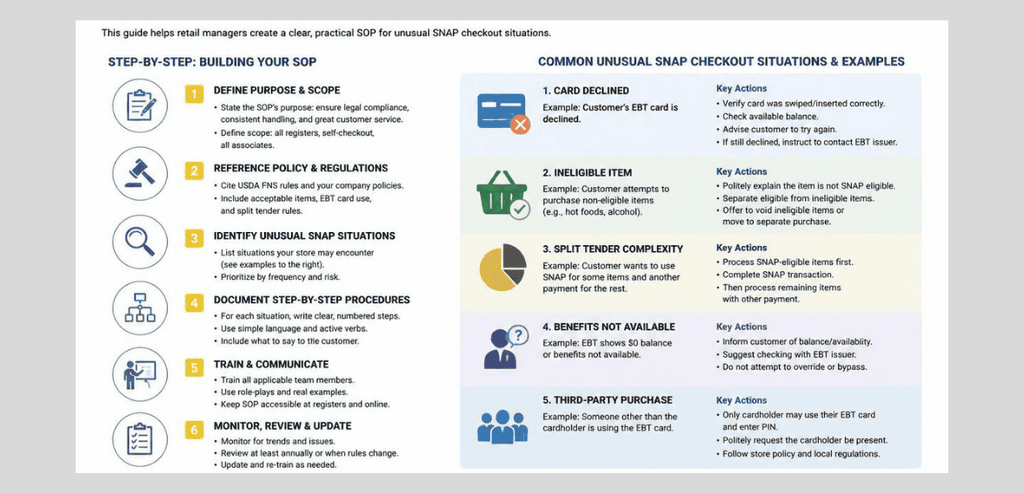
A SNAP checkout SOP describes the processes involved, with and without the usual guidelines, for your staff in handling SNAP payments at the register.
A SNAP checkout SOP is like your store’s memory. It doesn’t matter if your cashiers leave, if your managers are on vacation, or if the policies are changing. With your SNAP checkout SOP, whoever is working the front end is informed. It shows the USDA that you’re complying with their concerns.
The goal is simple. Remove guesswork from the checkout lane. When a rare situation appears, your cashier reaches for the SOP instead of improvising.
Start With the Basics: What SNAP Actually Covers
Before you can document the odd cases, your SOP needs a rock-solid foundation. Every procedure builds on one core question: is this item eligible?
SNAP only covers food that is intended for preparation at home. SNAP covers a variety of food items including breads and cereals, fruits and vegetables, meat, fish, and poultry, dairy, and even seeds and plants that produce food. As a general rule, anything that would feed a household is SNAP-eligible.
There is a variety of food that has always been SNAP-ineligible. Alcohol, tobacco, and even food that is sold as ready-to-eat, prepared, and/or hot cannot be purchased with SNAP benefits. There are also non-food items that are outside the scope of SNAP; these include paper and cleaning products, and even food for pets.
This is a good detail to include in your SOP. Eligibility for SNAP is largely determined by the product label. A product that is an energy drink or a protein drink, and also has a Nutrition Facts panel, is SNAP-eligible. However, the same drink with a Supplement Facts panel is not SNAP-eligible. Training cashiers to recognize this difference helps to eliminate a significant number of errors.
USDA Food and Nutrition Administration (FNA)
The USDA Food and Nutrition Administration administers SNAP at the federal level. FNA develops regulations, designates SNAP retailers, and conducts compliance reviews. When your staff encounters a compliance question that your SOP does not address, USDA SNAP retailer resources serve as the authoritative guidance. This agency operates a SNAP Retailer Service Center, which provides retailers a direct contact for official guidance on SNAP-eligible items and compliance issues. To eliminate reliance on rumors or informal guidance, direct your staff to these resources.
Unusual SNAP Checkout Situations Your SOP Must Cover
Basic transactions rarely cause trouble. The edge cases do. Here are the scenarios that trip up cashiers most often, along with the way your SNAP checkout SOP should handle each one.
Split-Tender Transactions
This is the big one. A split-tender sale occurs when a single order combines both SNAP-eligible and ineligible items. The customer pays for the SNAP-eligible food using their SNAP benefits and pays for the ineligible items via cash, debit, or credit.
Your standard operating procedure will help your cashiers in the case of a split sale. The point-of-sale system will apply the SNAP benefits to eligible items. Ineligible items are placed on a second tender. Sales tax has a special case. It can only be applied to the second tender. You cannot tax the food covered by the EBT card.
There are two more important points to make in this section. You cannot charge a transaction fee to use an EBT card, and you cannot enforce a minimum purchase requirement. A SNAP shopper has to be treated like any other customer.
Handling New State Item Restrictions
The eligibility landscape shifted in 2026. For years, SNAP rules were identical nationwide. Now several states have federal waivers that restrict items once allowed.
The first wave took effect in Indiana, Iowa, Nebraska, Utah, and West Virginia on January 1, 2026. Texas followed on April 1, 2026. Soda, candy, and many sweetened or carbonated drinks (including diet and zero-sugar versions) became restricted. Florida implemented restrictions on April 20, 2026.
One important update: on June 22, 2026, a federal court in Aragon v. Rollins vacated the waivers in Colorado, Iowa, Nebraska, Tennessee, and West Virginia, so those restrictions are not currently enforceable while the ruling stands and the appeal is pending. Throughout 2026, other states have continued to implement similar restrictions.
Your SOP for SNAP checkout must incorporate your state’s restrictions. The most straightforward method is maintaining a price book. To ensure compliance, a price book must have a SNAP-eligibility flag for every item. It is the retailer’s responsibility to ensure compliance across their systems. To be proactive, build a monthly price book audit into your SOP to prevent any potential oversight.
One subtlety helps reduce the anxiety caused by customer questions regarding the new restrictions. The new restrictions apply to SNAP food benefits only. Customers with cash benefits (such as TANF) on the same EBT card will be able to purchase restricted items. This is the same as purchasing with cash.
Returns and Refunds on EBT
Refunds cause real confusion, and getting them wrong is serious. The rule is absolute. When a customer returns an item bought with SNAP, the refund goes back onto the EBT card electronically through your POS device. Never hand over cash.
Giving cash back for a SNAP purchase counts as trafficking. It is illegal and can cost you your authorization. Make this the single boldest line in your entire SNAP checkout SOP.
Partial refunds on split-tender orders need their own note. Your procedure should explain how the system restores the SNAP portion to the card and the other portion to the original payment method. When in doubt, refund each item to the tender that paid for it.
When the POS System Goes Down
Systems fail. Connections sever. Prepare your SOP for times when the register cannot contact the EBT host. The answer is the manual voucher process.
Write clear instructions for the process. The cashier calls the state EBT processor’s retailer helpline. Once the cashier receives an authorization number, the processor confirms available funds and places a hold. The staff then completes a manual paper voucher. This contains the card number, the transaction date, the transaction amount, the store information, and the signatures of the customer and of the store supervisor.
The customer keeps a copy of the voucher. The manual vouchers must be processed by the store’s third-party processor within ten days. Always have a stock of blank vouchers. A voucher-less store during a system outage loses sales and frustrates customers.
EBT at Self-Checkout
Banning SNAP at self-checkout has no basis in law. Based on federal law and guidance, EBT customers can use self-checkout as long as the kiosk belongs to an authorized store and the items purchased are SNAP-eligible. Outside of that, the decision is retailer- and location-based.
Your SOP should indicate how your store interprets EBT at self-checkout. If your store allows EBT at self-checkout, an employee must step in for certain scenarios, such as split-tender transactions or when restricted items are present. Some retailers prefer directing EBT transactions to staffed lanes because a cashier will more reliably assess purchase eligibility than a self-checkout kiosk. Either way, the policy should be clear to both employees and customers.
Declined Cards, PIN Errors, and Balance Questions
Everyday friction deserves a script too. When a card declines, the cashier should stay neutral and never announce the reason to the store. Offer the customer a chance to try again, use another tender, or set items aside. For balance questions, direct shoppers to the phone number on the back of their EBT card or their state benefits portal rather than guessing. A calm, private, respectful tone protects the customer’s dignity and your store’s reputation.
How to Write Your SNAP Checkout SOP Step by Step
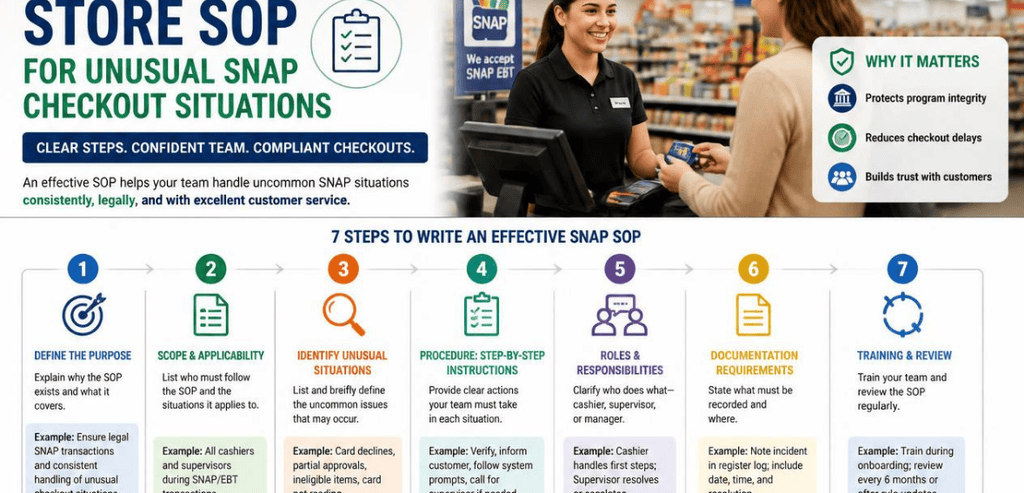
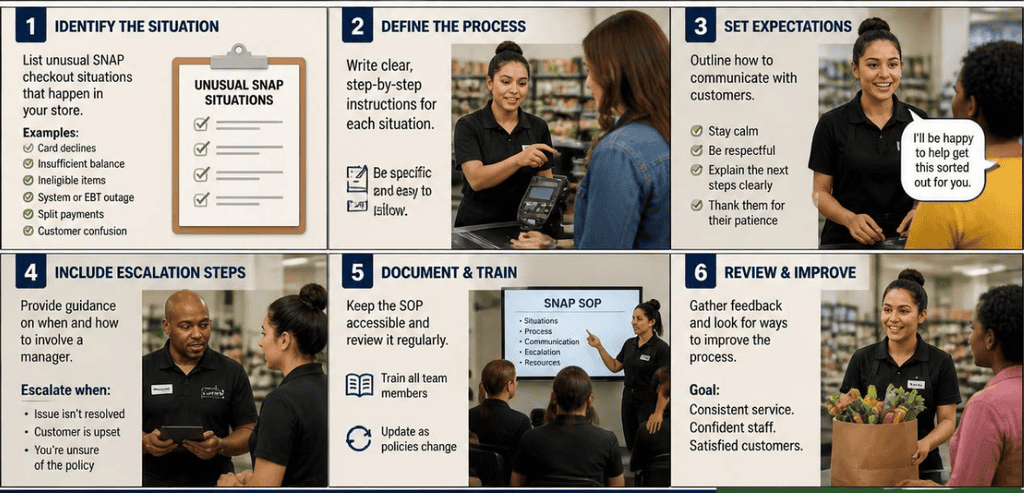
First, jot down every SNAP scenario your store encounters, from the everyday to the unusual. Next, create an easy-to-understand policy for each situation, the type that a day-one employee can pick up and follow. After that, add your specific POS screen examples. They say a single image next to a register instruction is worth a thousand words.
Next, insert the key SNAP compliance rules right where they apply, so cashiers get a ‘never give cash back’ reminder when they read the refund instructions. After that, list contact numbers for your SNAP program manager, your store manager, and USDA’s direct assistance line. Then print and save a copy of the SNAP Checkout SOP Instructions for Cashiers where they can access it for review.
Train Your Team and Keep the SOP Current
An onboarding binder does no good if it’s never opened. As part of onboarding, ensure new cashiers learn the SNAP checkout process. Hold brief refresher trainings when the rules change. Practice tricky scenarios like a split payment for a restricted item until the answer is second nature.
Designate one person as the official point of contact for the SNAP checkout process. With state restrictions rolling out through 2026 and new retailer stocking reports, the rules will continue to change. Review USDA transaction guidance and your state’s SNAP agency updates at regular intervals. It’s always better to have a working SOP than a perfect one that no one uses.
Conclusion
Unusual SNAP checkout situations are not really unusual. They happen constantly. The difference between a smooth store and a stressful one is preparation. A clear, current SNAP checkout SOP turns confusion into confidence. It protects your authorization, speeds up your lines, and treats every customer with respect.
Start small if you must. Document the split-tender flow, the refund rule, and the outage plan first. Build from there. Then train, review, and update. Your cashiers, your customers, and your bottom line will all thank you.
Frequently Asked Questions
What is a SNAP checkout SOP?
It is a written, step-by-step guide that tells cashiers how to process EBT payments and handle unusual situations at the register. It covers split-tender sales, refunds, restricted items, system outages, and more, keeping your store compliant and consistent.
Can you give cash back on a SNAP refund?
No. Refunds for items bought with SNAP must go back onto the EBT card electronically through your POS device. Giving cash for a SNAP purchase is trafficking, which is illegal and can lead to fines or losing your authorization.
How do I handle a SNAP sale when my POS system is down?
Use the manual voucher process. Call your state EBT processor’s retailer helpline for an authorization number, complete a paper voucher with the required details and signatures, give the customer their copy, and clear the voucher through your processor within ten calendar days.
Why are some items restricted for SNAP in 2026?
Several states received federal waivers to limit items like soda, candy, and certain sweetened drinks. Restrictions began in early 2026 and vary by state. Your store must configure its price book so the register blocks these items automatically wherever the rules apply.